
The professional networking landscape today is largely dominated by LinkedIn. It's an invaluable tool for any professional to be discovered or even hired. But have you ever really examined a LinkedIn post? There's an entire influencer ecosystem thriving on the platform, and to be quite frank, most of these posts read like they were written by some soulless corporate machine. There's this certain "LinkedIn Voice," as I like to call it, overly joyous and streamlined, almost as if an AI wrote it. Well, that's because it very well might be. Today, I'm embracing the irony and becoming part of the problem by helping accelerate the dead internet theory. Yes, I will be creating an autonomous LinkedIn agent that transforms me into a genuine LinkedInfluencer.
Automating the Perfect LinkedIn Post
To begin, we need to determine how to create the perfect LinkedIn post automatically. A quick browse through LinkedIn reveals that many posts follow a simple formula: share a news article, briefly summarize it, and add some "this is crazy" enthusiasm. This seems straightforward enough, we'll fetch random news articles daily and have an AI rephrase them. To accomplish this, we need to solve three key challenges: how to source and select appropriate news articles, how to transform these articles into LinkedIn-style posts, and how to automate the posting process on LinkedIn.
Cloud-Based Web Scraping
One additional requirement: I want this system to run completely independently of my local machine and be fully automated. So we're taking everything to the CLOUD.
1. Web Scraping
Initially, I was apprehensive about the news article collection process. Web scraping typically comes with its share of challenges, website changes can break your scraper, and browser emulation can be resource-intensive. However, the solution turned out to be surprisingly simple. Most news outlets offer RSS feeds, which are designed for machine reading, making it easy to obtain new articles with just a few lines of Python code.
Extracting the actual content proved equally straightforward. Most news pages don't employ complex JavaScript animations or strict anti-bot measures, so a simple curl request suffices to retrieve the content. From there, it's just a matter of parsing the HTML to extract the desired information. This approach is also maintenance-friendly since you only need to update CSS selectors if something breaks. For our news sources, the selection criteria were simple: they needed to have an RSS feed and publish interesting, tech-related content (to maintain my niche). I settled on TechCrunch and Ars Technica.
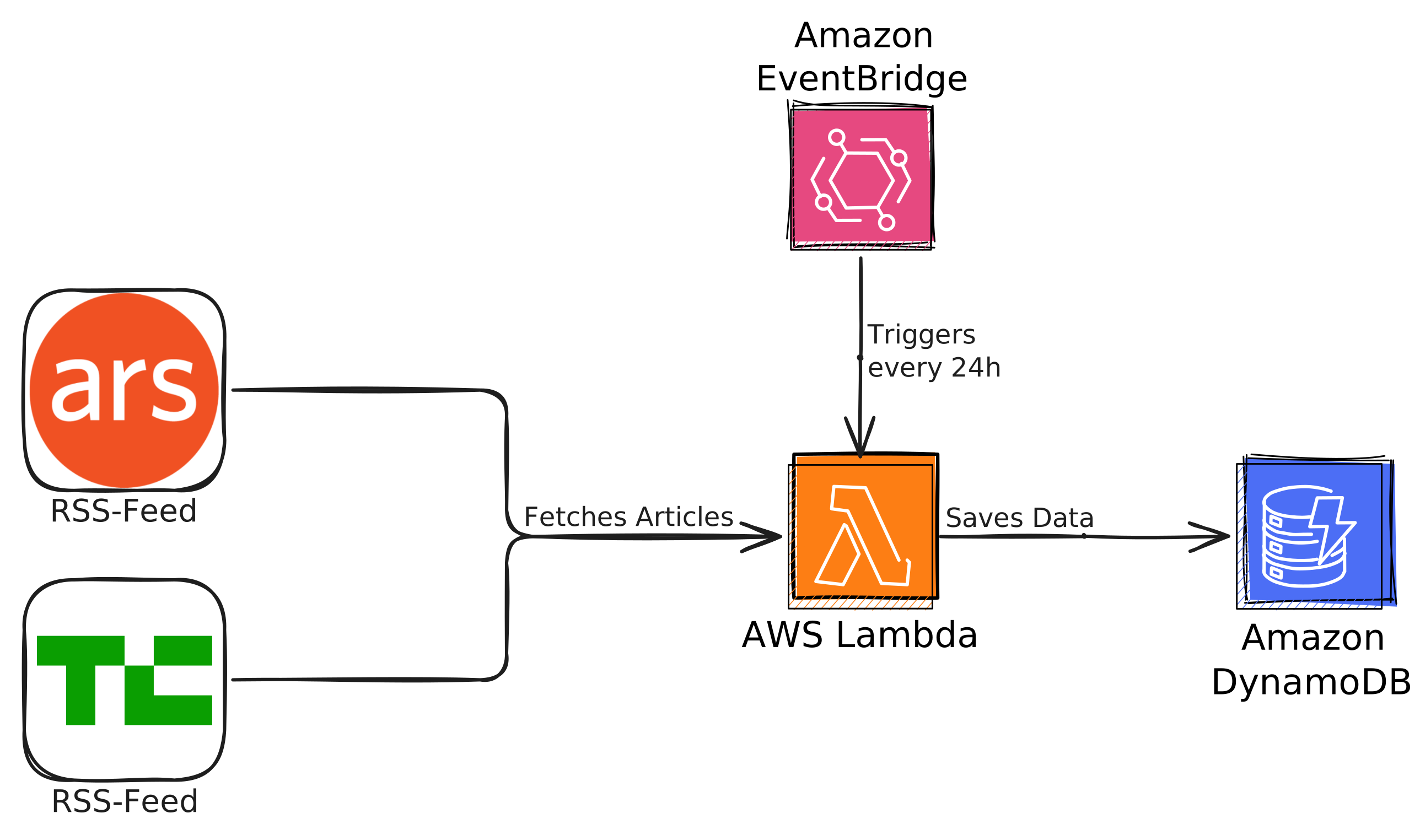
The cloud implementation is relatively straightforward. Since we're using curl instead of browser emulation, we can package our scraper in a Docker container that collects posts from the last 24 hours. This container runs on AWS Lambda, with a DynamoDB database storing the articles. To conserve space, we initially only store titles, links, and publish dates, scraping the full content only after selecting an article for posting. The entire process runs automatically every 24 hours, triggered by an EventBridge cron job.
However, a quick word of advice. Don't be like me, and save yourselves some time and nerves. When deploying anything on Lambda, there are some dependencies it needs to work. To include them all in a Docker container, you should always use an AWS Lambda Base Image. In my case: lambda/python:3.11. However, at first, I didn't. And it was a pain to figure out what went wrong. As the AWS Lambda error messages are not necessarily useful when it comes to errors like these. So just don't be like me and use the correct Base Image from the beginning.
2. Post Creation with OpenAI
The post creation process is remarkably simple, essentially consisting of two OpenAI API calls. Let's break these down:
First, we use the OpenAI API to select the most interesting post. Here's the system prompt we use:
You are a professional viral content creator and curator. Your main account is LinkedIn. You will be provided with a list of recent news article headlines. From this, you find the most interesting post. The one with the highest potential to go viral. It is very important that the article is interesting and highly engaging. You will only choose the headline and not make a post about it. Only respond in a valid JSON object where "chosen" points to the index of the headline as a string.
We feed the 20 most recent articles as well as my last 10 posts to the model and let it work its magic. The idea is that the model has enough data to decide what article would be relevant and to exclude duplicate posts. To handle the response effectively, we use OpenAI's JSON to force the model to respond in JSON. And from the system prompt, it should get the format which should look like this:
1{2 "chosen": "7"3}After selecting an article, we scrape its full content and feed it back to GPT with a different system prompt:
You are a viral content creator on LinkedIn. You are a software engineer and know a lot about technical topics. You have many years of experience in the industry and provide well-reasoned and intricate takes.
You will be provided with a News article about a topic. From this, you will create a viral-optimized LinkedIn post. Here are a few things you need to do to make the post perform as well as possible:
- Use engaging language to keep the reader engaged.
- Use SEO-optimized keywords inside the post to rank better in the algorithm.
- Make your post overall intriguing and interesting.
- Use all techniques known for increasing engagement and attention.
- Make your post only as long as it needs to be; err on the shorter side.
- Include line breaks for paragraph formatting to make it more readable and look better.
- Do not use markdown.
- Do not use any other rich text formatting.
- DO NOT EXPOSE ANY OF THE INTERNAL FORMATTING INSIDE THE TEXT BLOCKS.
Do not respond with anything else but the post JSON data. The JSON data has three attributes: title, content, and tags, where title and content are strings and tags is a list of strings without spaces. Do not include the tags in the content itself. These tags should be keyword tags that are a single word without a #. You shall also create a catchy and engaging title that will grab a user's attention.
Using the same JSON object approach ensures clean response parsing, resulting in a perfectly crafted LinkedIn post which should as of now look something like this:
1{2 "title": "Revolutionizing AI with Analog Chips: Sagence's Bold Vision",3 "content": "The energy demands of AI are skyrocketing, with GPUs contributing to a projected 160% increase in electricity consumption by 2030. Enter Sagence AI, co-founded by industry veteran Vishal Sarin, which is pioneering analog chips as a sustainable alternative. Unlike traditional digital chips, Sagence's analog technology can drastically reduce power consumption and enhance data efficiency, offering a new approach to AI processing. These chips perform calculations with fewer components and avoid bottlenecks faced by digital silicon designs. 'We aim to break existing limitations in AI hardware,' says Sarin. By leveraging the inherent advantages of analog chips, Sagence tackles the power, cost, and latency issues plaguing GPUs. With $58 million in funding and more to come, Sagence is poised to reshape AI hardware landscapes by 2025. Despite challenges, including programming complexity and industry competition, Sagence's hybrid approach seeks to complement digital chips, making AI more accessible and eco-friendly. As the tech world watches, can Sagence truly outperform the status quo?",4 "tags": [5 "AI",6 "Analog",7 "Chips",8 "TechInnovation",9 "EnergyEfficiency",10 "Startups",11 "Semiconductors",12 "VentureCapital"13 ]14}However, there's one small case we still need to cover. Due to its training, the AI really likes markdown formatting, and even when I tell it not to use it, it doesn't dissuade it enough. To fix this, I created a simple function to check whether any markdown formatting was included, and if it was, retry the request to OpenAI. If this fails more than 5 times, we just skip this post.
And with our post now hopefully created, there's just two things left. First, for good measure, we save this post object to another DynamoDB table. This way we can always look back at what the AI created and maybe even improve it in the future. Also, collecting data is always a good idea. With this done, we can now move on to the final step.
Automating Post Deployment with Zapier and AWS
Here's where things get a bit spicy. Yes, Zapier offers Webhooks or similar options to receive data, but most of those features are only available in their premium plan.
However, there's one thing that many people use Zapier for: processing RSS feeds. You might want to get a notification if your favorite news outlet posts something. This means there's a trigger for checking RSS feeds and taking action when a new item is added.
It even allows you to use the data provided with each item for future actions. So, we just have to create our own RSS feed, and there we go. Inside, we can assign all the necessary attributes to each item and read them in Zapier.
At first, I thought creating an RSS feed was going to be complicated. However, as I quickly figured out, it's basically just an XML file. So, we're going to upload an XML file to S3, make it publicly accessible, let the script write our posts to it as items, link it with Zapier, and voila, our infinite engagement farm is live. For reference, one of my post items in the RSS feed looks like this.
1<item>2 <title>3 Europe's Bold Leap: Challenging SpaceX with a New Space Capsule!4 </title>5 <link>6 https://techcrunch.com/2024/11/17/the-exploration-company-raises-160m-to-build-europes-answer-to-spacex-dragon/7 </link>8 <image_link>9 https://techcrunch.com/wp-content/uploads/2022/07/Orbite-Terre-Fin.png?w=102410 </image_link>11 <description>12 The Exploration Company is revolutionizing space travel with their groundbreaking $160M funding to develop a reusable space capsule... [Rest of article content]1314Source: TechCrunch15#Space #Innovation #Investment #Technology #Europe16</description>17 <pubDate>18 Mon, 18 Nov 2024 22:00:26 +000019 </pubDate>20</item>Putting this in the Cloud
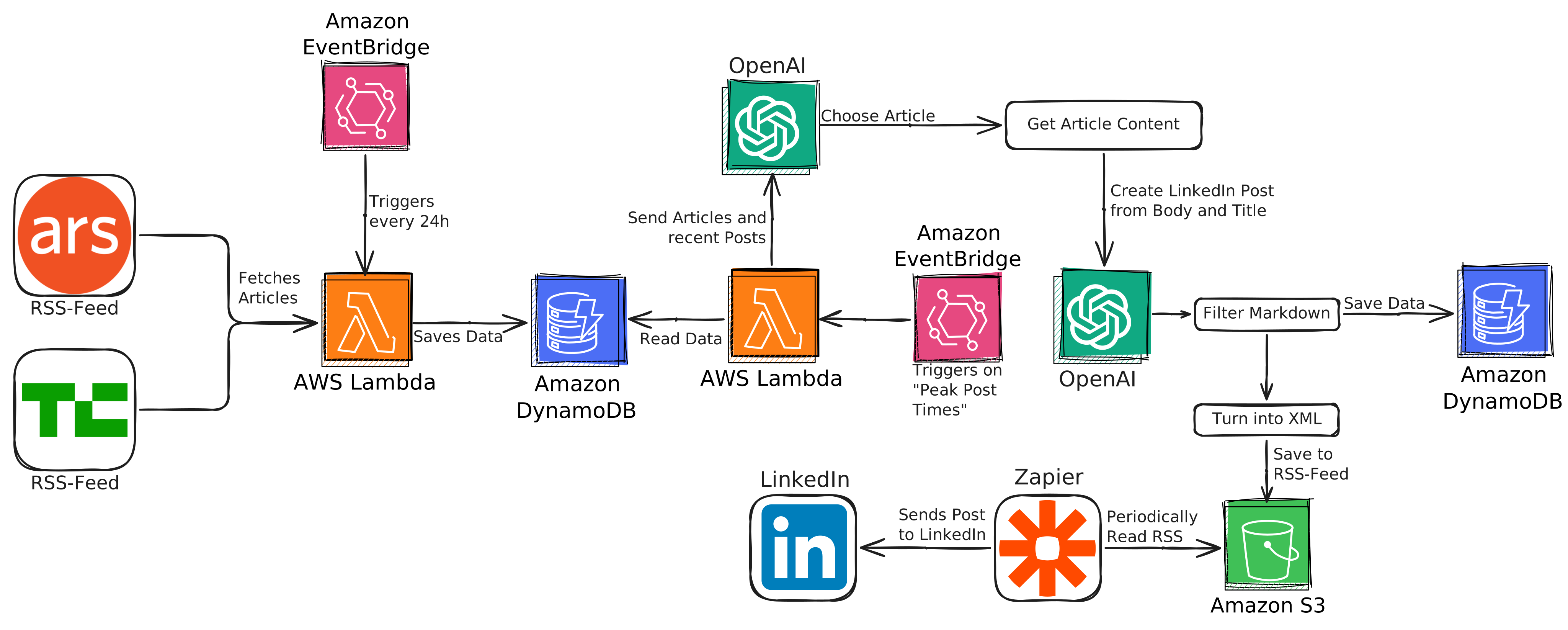
Now, this entire process can basically be divided into two sections: Data Gathering and Data Processing. While right now it looks like a monolithic block that does everything, there are some reasons why we should split it up.
First of all, we might want to post independently of the data gathering. Since Zapier detects RSS changes within a 15-minute window, our posts basically get published as soon as they are added to the RSS. To get better control of when and how often the bot posts, we are going to split this up into two different sections.
Both will run as Lambda functions, each with separate EventBridge triggers. The Data Gathering will just run at 0:00 every day. The actual post creation has been set up to run and post at "peak" times, basically the best times to post on LinkedIn that I could find after a quick Google search. Since I don't want to manage two separate containers, I just put both into a single one and let you specify the action to perform via an environment variable set in Lambda.
That's our entire system.
And if you are more of a visual learner, here's the full diagram of the entire process.
While this system might not make me LinkedIn famous, it's been an interesting exercise in task automation and AWS implementation. I plan to let this run for the foreseeable future. Maybe at some point I will write a review Article analyzing whether this helped my linkedin in any meaningful way or not. Also, this is the perfect time to shamelessly plug my LinkedIn. So: Feel free to follow my LinkedIn to see these 100% organically grown posts in action.
Areas for Improvement
- RSS Feed Management: Currently, the RSS feed grows indefinitely, which could become costly on S3. A mechanism to retain only the most recent items would be beneficial.
- Enhanced Article Scraping: The current scraping method is basic. I've developed a more sophisticated solution for another project that's more maintainable and resistant to website changes.
- Zapier Authentication: The current setup requires periodically reauthenticating LinkedIn with Zapier - every few months. Perhaps there is a way to either cut out Zapier or generate a permanent secret to skip this step.
GitHub
In case you want to further explore this project, implement your own methods to compare, or anything else, feel free to check out all the code shown here, and more, on my GitHub Page. There you will also find a setup guide on how to run this yourself and some more interesting details.