Job hunting is brutal, and everyone knows the golden rule: tailor your résumé for every position. Sounds simple enough until you're three hours deep, rewriting the same bullet points and questioning whether you're actually making improvements or just rearranging deck chairs. After going through this mind-numbing grind myself, I started imagining a different way. What if tailoring wasn't such a chore? What if we could build something that actually reads a job description, understands your experience, and creates a polished résumé without making you micromanage every word?
That vision led to CVolve, an AI-driven résumé builder that goes far beyond the usual "drag sections around and pick a template" approach. What began as a weekend project grew into a full-stack system orchestrating multiple AI agents, with typed models throughout and genuine user control over the entire process. Here's how I built it and what I learned along the way.
Why Another Résumé Builder?
Generic résumés might keep your workflow simple, but they rarely survive Applicant Tracking System (ATS) filters or grab a recruiter's attention. Most online builders let you assemble sections, choose from a handful of templates, and export a PDF. They don't understand what role you're actually targeting or why your specific background matters for that position.
CVolve takes a completely different approach. Instead of treating the job description as an afterthought, it becomes the primary input that drives everything else. The tool reads your professional profile, understands the target role, then runs multiple rounds of generation, critique, and refinement until each section truly connects with the opportunity.
The key difference: it doesn't feel like a black box. You can chat with the AI through an integrated overlay, adjust specific wording, and see changes happen instantly. It's less like filling out forms and more like working with a writing partner who gets what you're trying to accomplish.
Onboarding: From Chaos to Structure
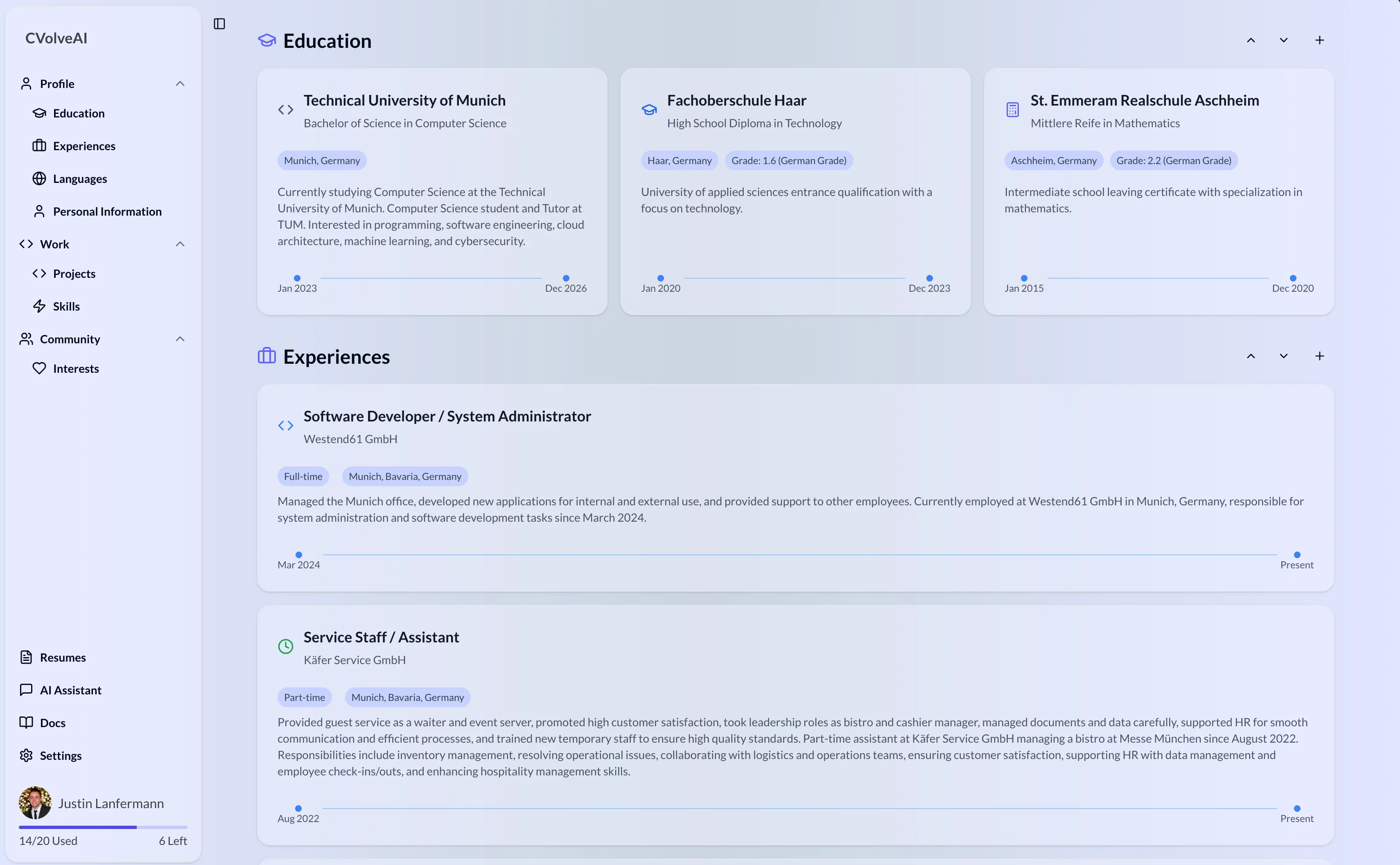
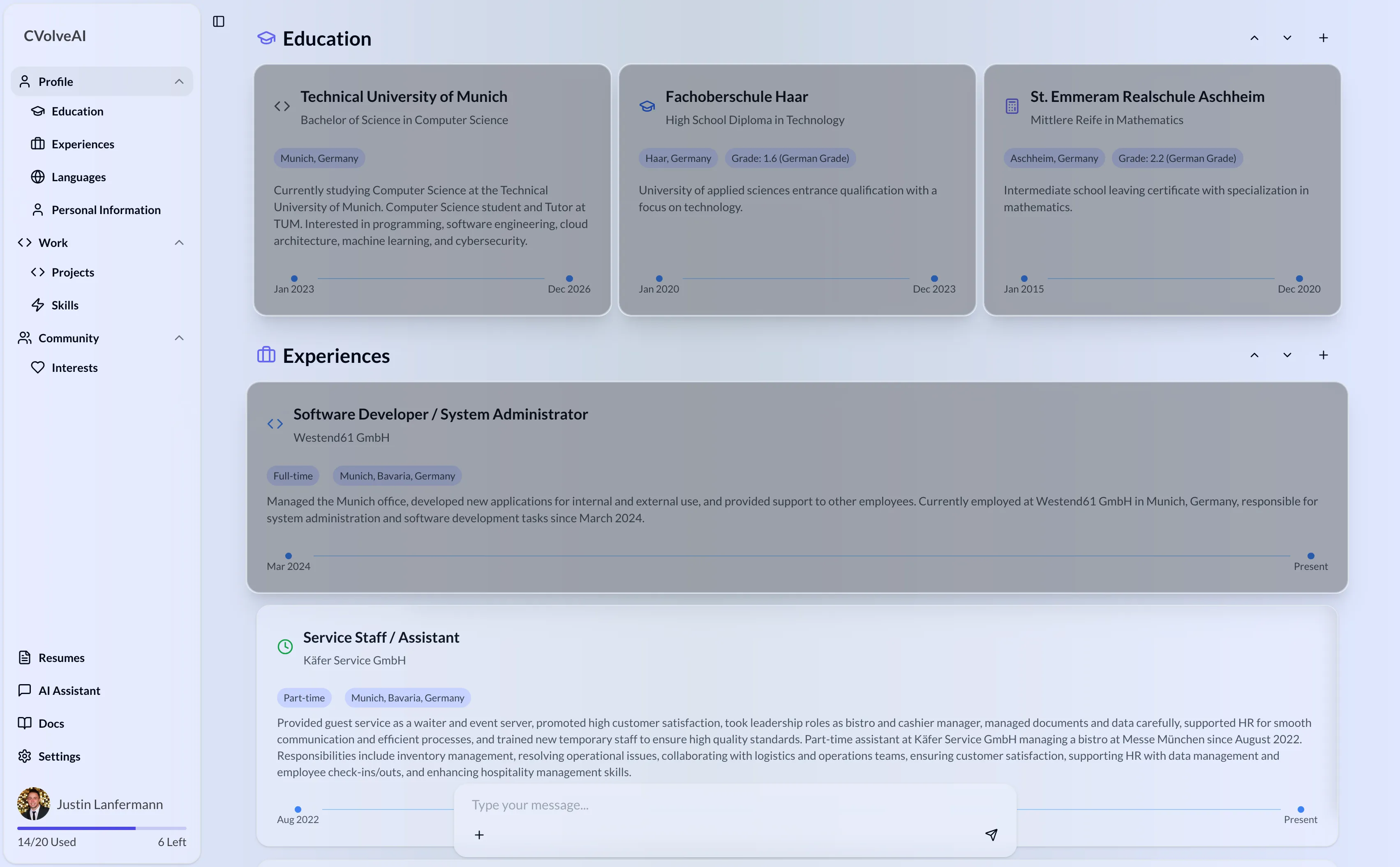
Before generating anything useful, CVolve needs to understand your professional story. The onboarding starts simple enough: social logins, basic contact info, current role details. But then it gets interesting. Instead of making you manually fill out endless forms, the system does the heavy lifting by pulling and intelligently combining information from multiple sources.
Behind the scenes, a sophisticated ProfileExtractionService handles asynchronous extraction from uploaded files, pasted text, and even links to your public profiles. Beyond manual inputs, the system pulls data from multiple sources, parses it, and weaves it together into one unified profile.
The economics of running this onboarding pipeline are surprisingly efficient: on average it costs around $0.40 per onboarding session to process, merge, and structure a user's professional data.
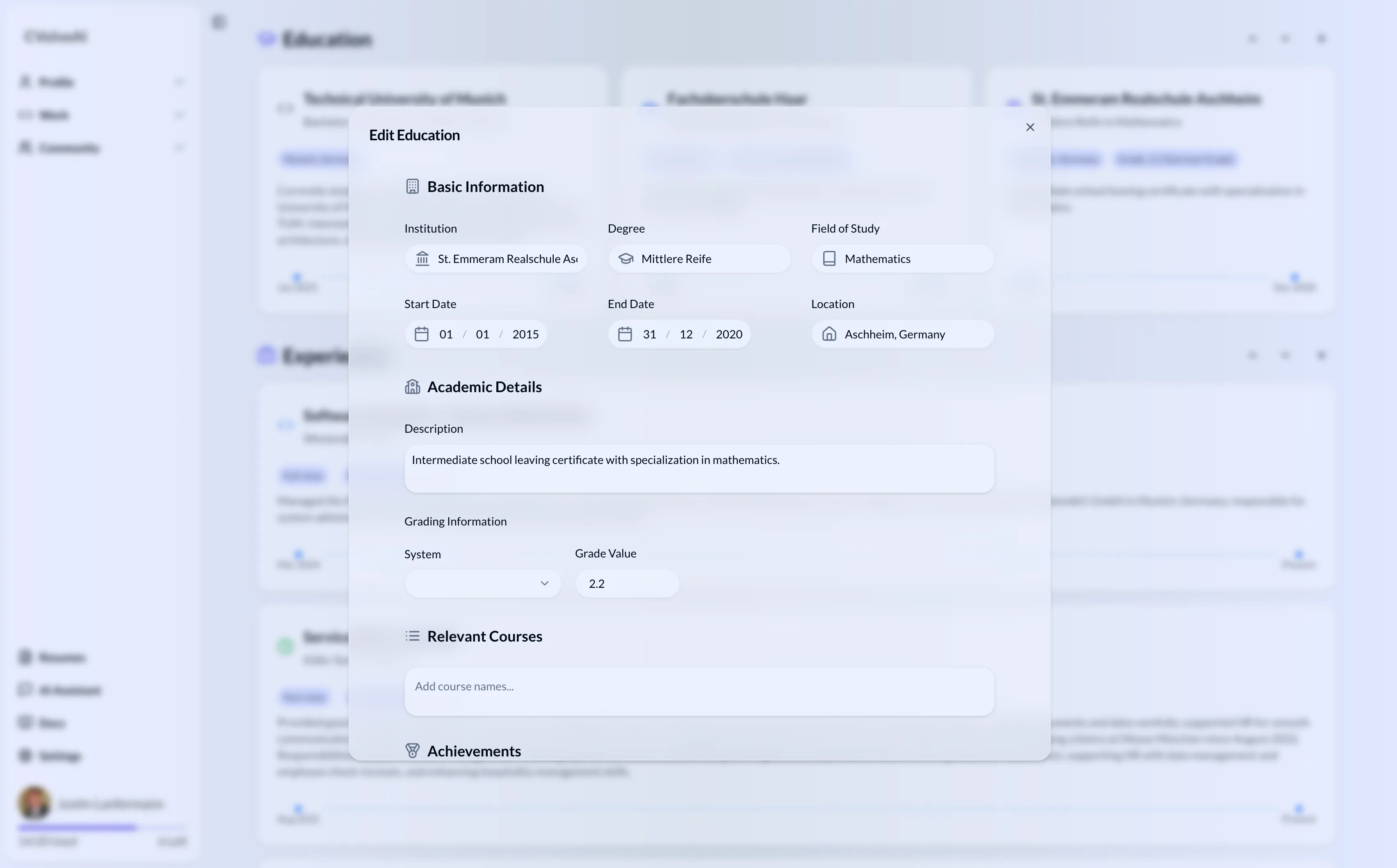
The merging process is surprisingly complex. A specialized full_profile_merge agent handles the tricky job of reconciling your new data with what's already in the system. It preserves original IDs, creates new ones when needed, and makes sure fields like "experiences" don't end up with annoying duplicates. If you upload a PDF of an old résumé, a separate file_to_markdown_agent converts it into structured Markdown so the extractor can parse it properly.
The AI Pipeline: Multi-Stage Generation
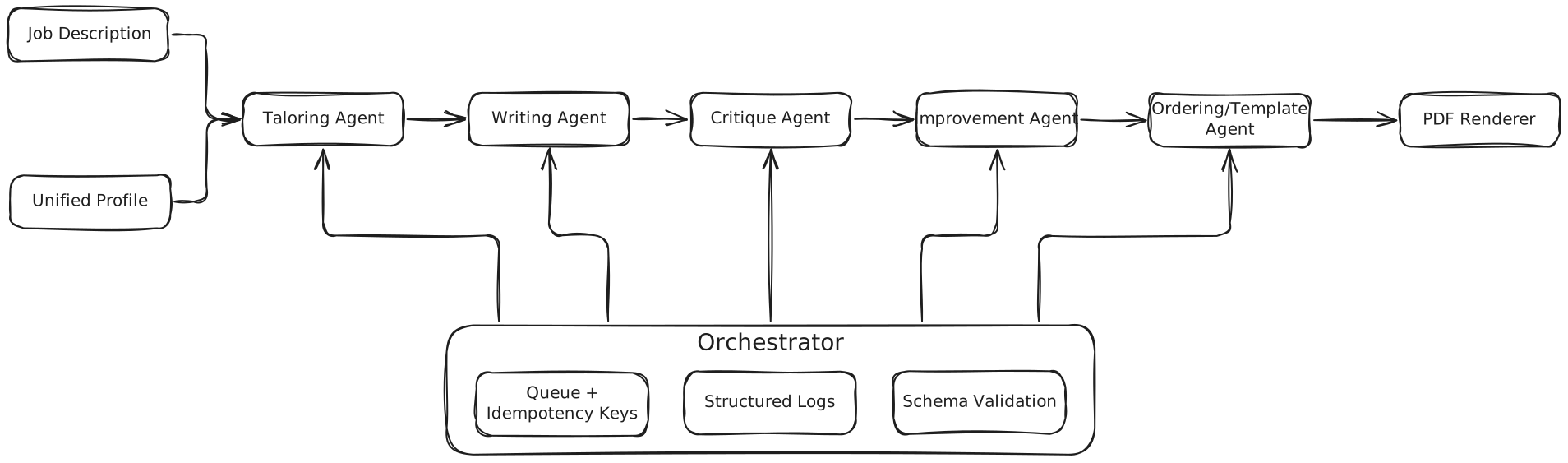
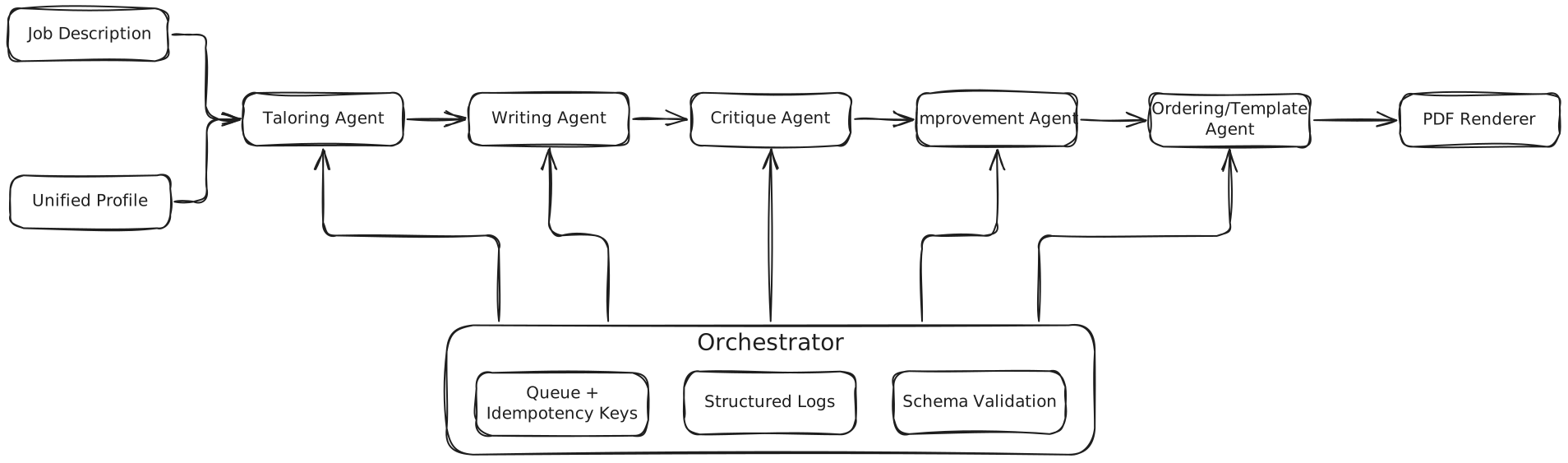
CVolve's intelligence lives in a Python backend that coordinates several distinct services. At its core is a ResumeOrchestratorService that seamlessly connects tailoring, writing, critique, improvement, and ordering agents. Each stage is isolated, fully typed with Pydantic models, and independently testable.
Generating a complete résumé with all stages of tailoring, drafting, critique, and assembly averages around $0.14 per résumé. This low per-document cost made it possible to support iteration and experimentation without breaking the bank.
Stage 1: Profile Tailoring
The pipeline begins by loading your complete profile from the database. A smart tailoring agent combines vector-similarity retrieval (to surface matches between the job description and your profile) with a Large Language Model (LLM) to select and rewrite the most relevant items, producing a version that highlights the skills and projects most relevant to that specific role.
Stage 2: Content Generation
Using the tailored profile, a writing agent creates comprehensive draft sections: summary, experience, education, projects. It validates that at least one section has meaningful content and shows clear warnings when something important is missing from your profile.
Stage 3: Critique and Improvement
A dedicated critique agent reviews the draft and returns a detailed list of sections that need work. An improvement agent then systematically revises those sections, focusing on clarity, impact, and alignment with the target role.
Stage 4: Final Assembly
Finally, an intelligent ordering agent determines the best sequence and picks an appropriate template. The orchestrator logs every decision for complete transparency: which template was chosen, why sections were arranged a certain way, what specific improvements were made throughout the process.
All agents in the pipeline ultimately run on GPT-4.1-mini, which I found to be the best balance of speed and performance after experimenting with many others (including Claude, Gemini, and Llama).
Frontend: Making AI Feel Instant
While the backend runs multiple complex AI steps, the frontend needs to feel snappy and responsive. CVolve's web client, built with Next.js 15 + TypeScript + React Query, uses optimistic updates and smart polling to show progress immediately.

AI Chat Overlay
Editing often brings up questions: "How should I describe this project?" "Should I include that internship from two years ago?" A contextual chat overlay appears when you select content and can also be triggered via ⌘K/Ctrl+K. It feels helpful and present without being pushy or getting in the way.
Editing: Real-Time Collaboration
Once your résumé is generated, you get a full PDF preview with an intuitive sidebar to reorder sections using smooth drag-and-drop.
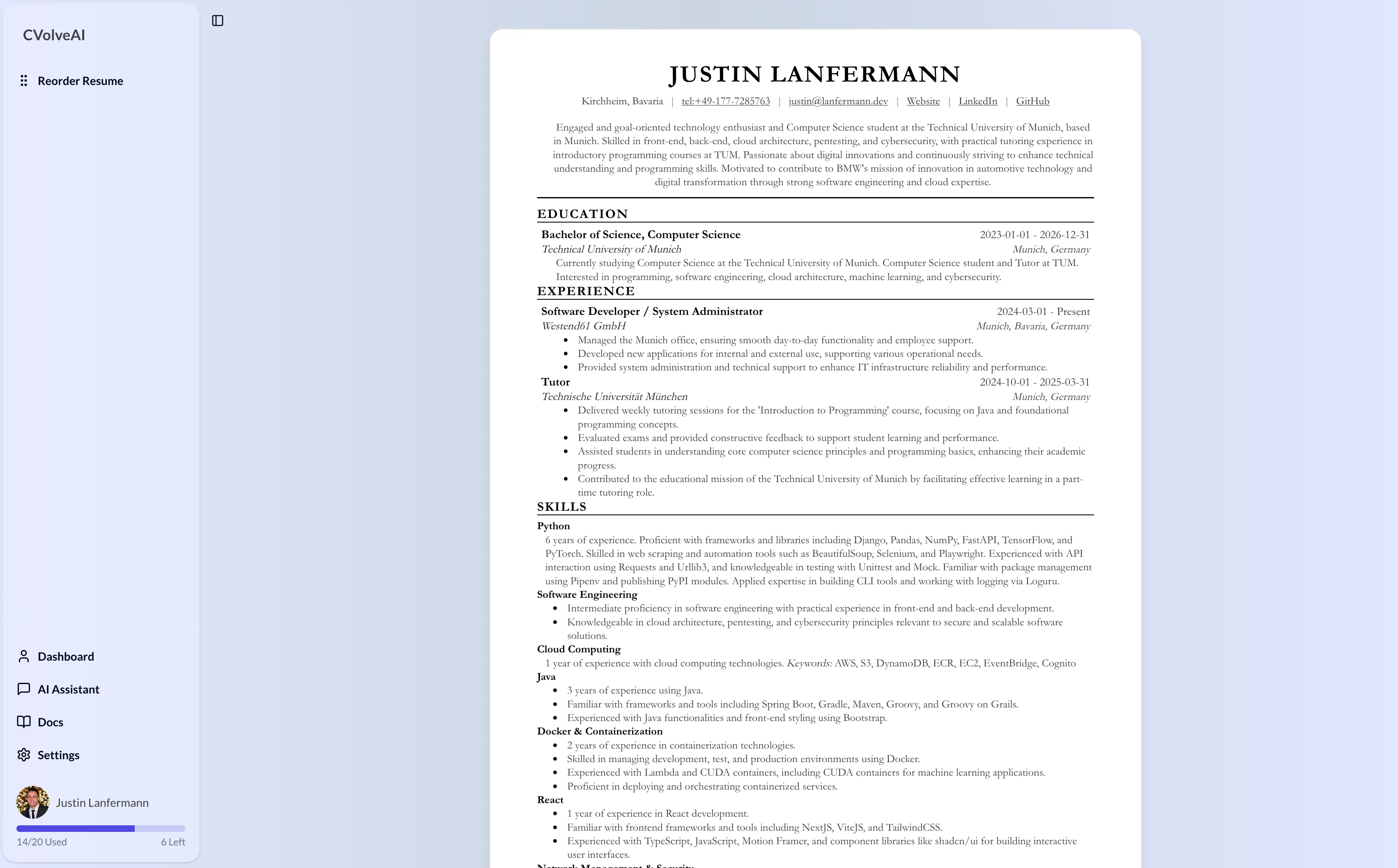
Power users can dive into the underlying Markdown for each section. Edit specific wording, highlight important metrics, or remove outdated items and watch the PDF update instantly. Combined with the chat overlay, it feels like working with a capable writing partner who understands your professional story.
Technical Lessons and Best Practices
Building CVolve taught me valuable lessons about orchestrating complex AI systems and shipping responsive user experiences. Here are the practices that mattered most in production, not just on paper:
Typed Contracts, Everywhere
Pydantic models on the backend and TypeScript interfaces on the frontend served as a single source of truth. When a model returned an unexpected shape, validation failed fast instead of corrupting application state. Three patterns that consistently worked:
- Shared schema package: DTOs used by both services and the web client to prevent dangerous drift.
- Validate at boundaries: Every API handler parses input and output through a schema. No exceptions.
- Test the edges: Randomized tests caught subtle issues early.
Orchestration Over Naive Chaining
The orchestrator made dependencies explicit and kept steps completely swappable. It also made failures predictable, which is exactly what you want. The key patterns:
- Deterministic steps: Idempotency keys on long-running tasks so retries are always safe.
- Parallel where it makes sense: Independent enrichments run concurrently while ordering happens later.
- Structured logging: Step IDs, durations, and inputs/outputs (properly hashed) for quick debugging.
UX Beats Raw Intelligence
Nobody cares how sophisticated your pipeline is if the interface feels sluggish or unresponsive. These UX decisions made the product feel genuinely "instant":
- Optimistic flows: Create, reorder, and edit operations show results immediately and sync in the background.
- Contextual help: The chat overlay appears exactly where you're editing and stays out of the way otherwise.
- Keyboard-first design: Navigation, section insertion, and input focus via shortcuts kept power users in flow.
What's Next for CVolve
The roadmap includes more modern templates with dark-mode PDFs, tailored cover letters using the same critique-and-improve loop, and possibly a lightweight recruiter portal for better candidate discovery.
What started as automating a tedious task evolved into a comprehensive lesson in building AI systems that feel intelligent without being opaque. The goal was creating tools that amplify human judgment rather than replace it, and I think CVolve hits that sweet spot.